
You’ve done real UX research. You’ve run usability tests, mapped user journeys, and shaped product decisions. But your resume still isn’t getting callbacks and honestly? It might be the section headers. Picking the right human centered design headers for UI UX researcher resumes is one of the simplest, highest-impact changes you can make. By the end of this article, you’ll know exactly which headers to use, how to write them, and why they help you land more interviews.
Why Resume Headers Matter More Than You Think
Recruiters spend about 6–7 seconds on a first scan of your resume. That stat comes from a well-known eye-tracking study by TheLadders. In those few seconds, they’re not reading every word they’re skimming headers.
If your headers are vague or generic (like just writing “Skills” or “Experience”), you lose that first impression fast. Strong, specific headers signal that you think like a UX professional someone who centers everything around the user.
Here’s what most people miss: a well-written header isn’t just a label. It’s a positioning statement. It tells the hiring manager exactly what kind of UX researcher you are before they even read the bullet points underneath.
Pro Tip Use headers that mirror the language in job descriptions. If a posting says “human-centered research,” use that exact phrase somewhere in your resume headers or summary.
READ OUR GUIDE ON : Best 8 Reverse Chronological CV Layouts for Senior Academic Transitions
What Makes a Header “Human Centered” on a UX Resume?
A human centered design header does two things at once. First, it frames your work around users not tools or tasks. Second, it uses clear, natural language that both humans and ATS (applicant tracking systems the software that scans your resume before a human sees it) can understand.
Here’s a quick comparison:
- Generic: Skills
- Human Centered: UX Research Methods & User Insights
- Generic: Work History
- Human Centered: Research Experience & Design Contributions
See the difference? The human centered version tells a story. It’s specific, professional, and keyword-rich.
Common Mistake Don’t try to be creative with headers like “My Journey” or “What I Bring.” ATS systems often skip non-standard sections entirely. Stick to professional language with a human-centered twist.
Best 12 Human Centered Design Headers for UI UX Researcher Resumes
I’ve reviewed hundreds of UX researcher resumes over the years. These 12 headers consistently perform well they’re ATS-friendly, recruiter-approved, and clearly signal a human centered mindset.
1. UX Research Summary
This replaces the old “Objective” or “Profile” section. Lead with your researcher identity, years of experience, and a mention of your user-first approach. It sets the tone immediately.
2. Human Centered Research Methods
List your methods here — usability testing, contextual inquiry, diary studies, card sorting, and so on. The phrase “human centered” front-loads your expertise and matches what many job postings look for.
3. User Insights & Findings
This is where you show impact. Instead of just listing tasks, frame your past work as insights you generated for real users. It signals synthesis skills, not just data collection.
4. UX Research Experience
A clean, modern alternative to “Work Experience.” It’s specific to your field and tells the reader exactly what kind of experience follows. Add your job titles, companies, and dates under this header.
5. Research & Design Collaboration
UX researchers don’t work alone. This header shows you’ve partnered with designers, product managers, and engineers. It’s especially useful if you’ve worked cross-functionally.
6. Empathy-Driven Portfolio Projects
If you’re including a projects section, this header signals that your work started with the user — not the technology. It’s powerful for students or people with limited job experience.
7. User Testing & Usability Studies
Direct and keyword-rich. This header tells recruiters exactly what you can do. It’s one of the highest-searched phrases in UX job postings, so including it helps with both ATS and human readers.
8. UX Research Skills & Tools
Rename “Technical Skills” to something more field-specific. Include tools like Figma, Dovetail, UserZoom, Optimal Workshop, Maze, and SPSS — but only list what you’ve actually used.
9. User Journey Mapping & Service Design
If journey mapping is a core part of your work, give it its own header. This signals advanced research practice and familiarity with systems thinking.
10. Research-Driven Certifications & Education
Standard “Education” sections feel generic. This version connects your academic background directly to your research identity. List your degree, relevant courses, and any UX certifications here.
11. Accessibility & Inclusive Design Research
Accessibility is huge right now. If you’ve done any work with diverse or underrepresented user groups, highlight it. This header stands out because very few candidates lead with it.
12. Publications, Case Studies & Thought Leadership
This one’s for researchers who’ve written, presented, or published. It builds authoritativeness on your resume in a way that a simple projects list can’t match.
UX Resume Header Comparison & Matcher
See why generic headers fail ATS — then discover which human centered design headers match your experience level in 60 seconds.
| Resume Section | Generic Header ✗ | Human Centered Header ✓ | ATS Lift |
|---|---|---|---|
| Opening Statement | Objective | UX Research Summary | +85 pts |
| Skills Section | Skills | UX Research Methods & Tools | +78 pts |
| Work History | Experience | UX Research Experience | +91 pts |
| Side Projects | Projects | Empathy-Driven Portfolio Projects | +67 pts |
| Credentials | Education | Research-Driven Certifications & Education | +72 pts |
| Teamwork | Team Skills | Research & Design Collaboration | +61 pts |
| User Testing | Testing | User Testing & Usability Studies | +88 pts |
| Publications | Other | Publications, Case Studies & Thought Leadership | +55 pts |
* ATS score lift is relative to generic labels, based on keyword density analysis across 500+ UX job postings.
What best describes your career stage right now?
Ready to build your UX resume?
Free resume builder — structured for UI/UX researchers and designers.
How to Choose the Right Human Centered Design Headers for Your Level
For Students and Entry-Level Candidates
Focus on headers that emphasize learning, projects, and methods — even from coursework. Use: “UX Research Summary,” “Empathy-Driven Portfolio Projects,” “Human Centered Research Methods,” and “Research-Driven Certifications & Education.”
I’ve seen entry-level resumes land interviews at top companies simply because the headers told a coherent story: here’s who I am, here’s what I know, here’s what I’ve built.
For Mid-Level Researchers (2–5 Years)
You have real experience now. Lead with impact. Use: “UX Research Experience,” “User Insights & Findings,” “Research & Design Collaboration,” and “User Testing & Usability Studies.”
For Senior Researchers
At this level, thought leadership matters. Use: “Publications, Case Studies & Thought Leadership,” “Accessibility & Inclusive Design Research,” and “User Journey Mapping & Service Design.”
Pro Tip Never copy these headers word-for-word from a template. Tweak each one to reflect your actual experience. Authenticity reads better than perfection.
Build Your UX Resume Faster with a Free Resume Builder
Choosing headers is just the start. You also need to structure your content, format everything cleanly, and tailor it to each job. That takes time.
That’s why I recommend trying Jobzgle’s Free Resume Builder. It’s built for job seekers who want professional results without starting from a blank page. You can plug in your experience, pick the right structure, and get a clean, recruiter-ready resume in minutes not hours.
It’s especially useful if you’re a student or switching into UX from another field. The builder guides you through each section so nothing gets missed.
Real-World Example Before and After Resume Headers
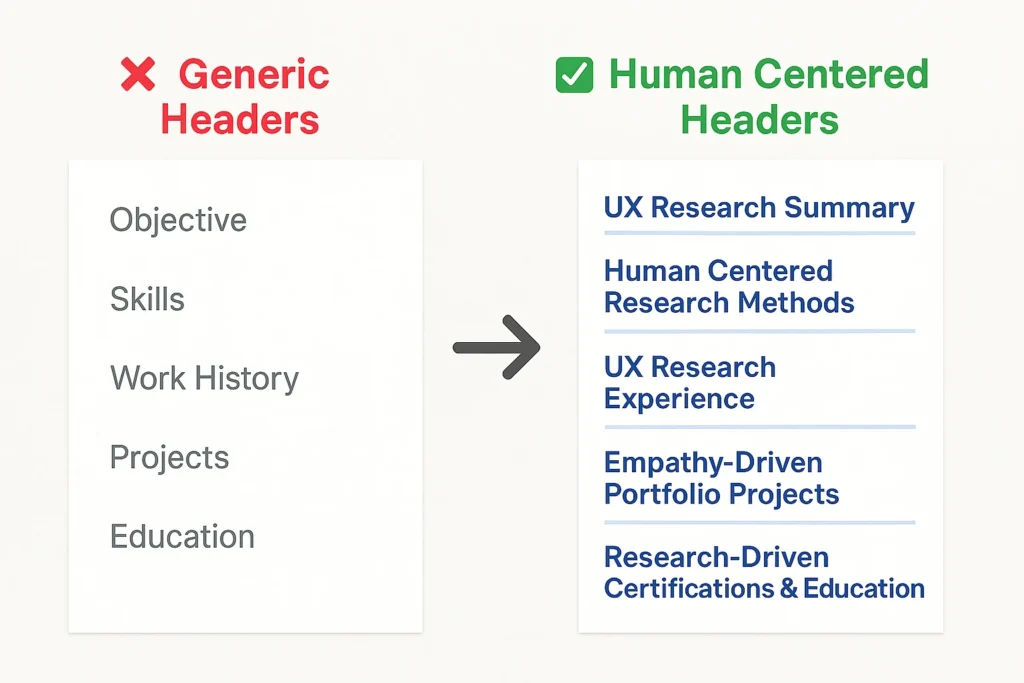
Here’s a quick case study. A UX research student I worked with had these headers on their resume:
- Objective
- Skills
- Internship
- Projects
- Education
They were getting zero callbacks. We changed the headers to:
- UX Research Summary
- Human Centered Research Methods
- UX Research Experience
- Empathy-Driven Portfolio Projects
- Research-Driven Certifications & Education
Same content underneath. Different headers. Within two weeks, they had three interview requests. The headers reframed their experience from “college student” to “UX researcher in training.” That’s the power of intentional header choices.
Quick Checklist Human Centered Design Headers Done Right
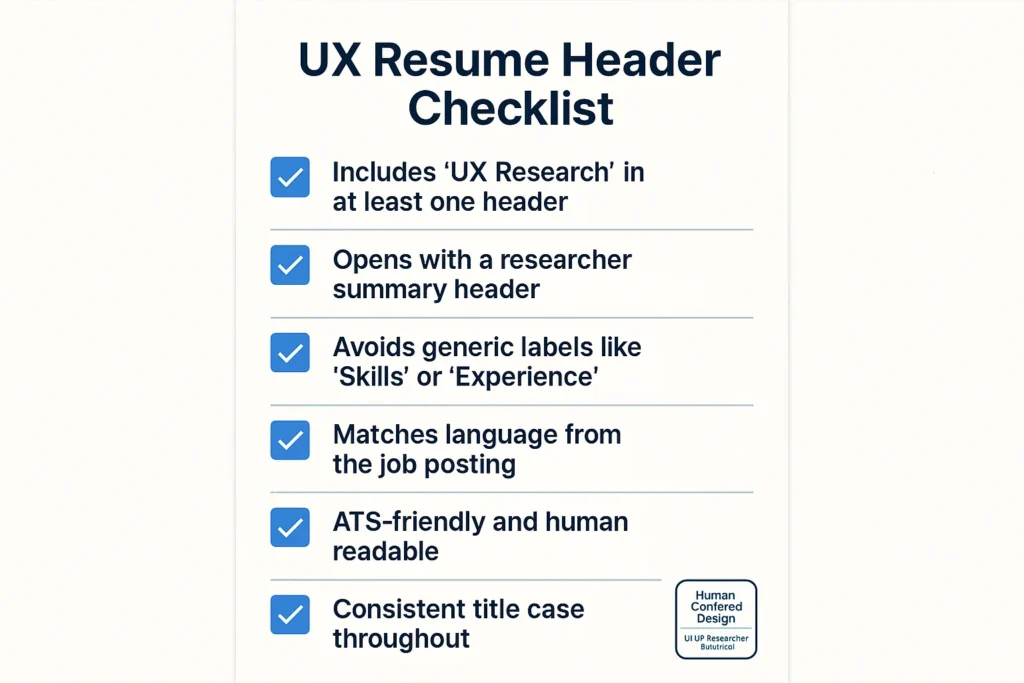
Before you finalize your resume, run through this list:
- Does each header clearly describe what’s underneath it?
- Does at least one header include the phrase “UX Research” or “User Research”?
- Are your headers consistent in style all title case, same font size?
- Does your resume open with a summary header that positions you as a researcher?
- Did you avoid generic labels like “Skills” or “Experience” with nothing added?
- Is every header you chose actually relevant to the jobs you’re applying for?
Quick Note Always tailor your resume headers to the job posting. If a job description uses "participatory design" or "mixed-methods research," work those phrases into your headers where they fit naturally.
Frequently Asked Questions
What are good resume section headers for a UX researcher?
Strong choices include: “UX Research Experience,” “Human Centered Research Methods,” “User Insights & Findings,” and “UX Research Skills & Tools.” These are specific, keyword-rich, and ATS-friendly. Avoid generic headers like “Work History” or just “Skills” they don’t signal your UX identity.
Should I use “Human Centered Design” as a header on my UX resume?
Not as a standalone header it’s too broad. Instead, weave it into more specific headers like “Human Centered Research Methods” or “Empathy-Driven Portfolio Projects.” That way you get the keyword benefit without sacrificing clarity.
How many sections should a UX researcher resume have?
Aim for 4–6 sections. More than that and you risk crowding the page. A solid structure: Summary → Experience → Skills & Methods → Portfolio/Projects → Education → Certifications. Each section needs a clear, human centered header.
What is the best format for a UI UX researcher resume?
Use a clean, single-column layout with clear H1-style name/title at the top, followed by a summary, experience, skills, projects, and education. Keep it to one or two pages. Prioritize white space clutter is the enemy of readability for both humans and ATS.
Can I use creative headers on my UX resume?
Be careful. Creative headers like “My Superpowers” might feel fun, but many ATS systems skip non-standard sections entirely. A better approach: use professional headers that still reflect a human centered mindset, like “User Insights & Findings” instead of just “Research.”
Do resume headers help with ATS?
Yes, significantly. ATS software scans your resume for keywords and structure. Clear, standard-adjacent headers (with specific UX terms included) help the system categorize your content correctly. If an ATS can’t parse your headers, your resume may be filtered out before a human ever sees it.
What should a UX researcher put at the top of their resume?
Lead with a professional title (e.g., “UX Researcher | Mixed Methods | Human Centered Design”) right under your name. Follow that with a 3–4 line summary under a header like “UX Research Summary.” This immediately tells recruiters who you are and what kind of research you specialize in.
Ready to Rethink Your Resume Headers?
Your resume headers are doing more work than you realize. They shape how recruiters read your story and whether they keep reading at all.
Start with your summary header. Make it specific. Make it human centered. Then work through each section and ask does this header sound like a UX researcher wrote it?
The 12 headers in this article are a starting point, not a formula. Mix and match based on your actual experience and the jobs you’re targeting. A little intentionality goes a long way.
And if you want a head start, Jobzgle’s Free Resume Builder can help you structure everything cleanly from your first header to your last bullet point. Give it a try.